
Why your Notes App Won't Survive the Agent
Your Notes App Is a Skeuomorph


The realization
I have been a long-time knowledge management enthusiast. The idea of having a repository of external notes in the form of an interconnected web (a digital Zettelkasten) has always appealed to me.
Initially I started out using Obsidian, loving the focus on plain text (markdown), ability to link notes easily, and a cool graph that could visualize the connectedness.
But a few years ago I migrated to Logseq, because I felt this forced me more to focus on the notes and not the storage/folder-structure.
Logseq became my system for capturing research, project notes, reading logs, and half-formed ideas. It worked well.
Then the world changed. I started building with AI agents, and I wanted my agent to have access to everything I knew. Not through me copy-pasting into a prompt, but natively: the agent should be able to search my notes, follow links, create new entries, and build on what was already there. The natural first step was of course to connect Logseq to my agent using the Model Context Protocol (MCP). The MCP protocol allows an agent to be connected to tools and resources without the agent needing pre-existing knowledge about the domain.
Now, Obsidian already has a pretty good MCP server, but Logseq... Logseq not so much.
So, I decided to build my own. How hard could it be? And indeed, it was pretty straightforward to build an MCP server for retrieving notes from Logseq.
Writing notes was a little less straightforward, however. This has to do with their block system, but that is not relevant for this article.
While thinking on how to approach this part of the integration, it suddenly dawned on me:
Why am I building a bridge to Logseq?
Not “how,” but “why”! Every operation on my list was a data operation. Read, write, search, link. The agent didn’t need an outliner. It didn’t need a graph view. It didn’t need a sidebar, or block references, or a query language. It needed seven API calls and a search index.
I wasn’t looking at an integration problem. I was looking at a tool that solved a problem that no longer existed!
Logseq is a UI wrapped around a file format
Let’s be specific about what Logseq actually is, structurally.
Logseq is an Electron application that presents a block-based outliner interface over a folder of markdown files. The “graph database” that powers its linking, queries, and graph view is a runtime index: it is rebuilt from the markdown files every time you open the app. The files are the source of truth. The database is a cache.
Every feature Logseq offers is a cognitive aid for a human operator. The outliner helps you think hierarchically. The sidebar lets you navigate between different operational modes. Block references let you reuse content without copying it. The graph view shows you the topology of your knowledge. Linked references surface connections you didn’t explicitly create. The query language lets you filter and aggregate across pages.
These are good features. They solve real problems. But notice who they solve problems for: a person sitting in front of a screen, navigating a knowledge base with eyes and hands and a limited working memory.
The agent has none of these constraints. It doesn’t need to navigate between different operational modes; it does so internally. It doesn’t need an outliner to think hierarchically; hierarchy is just nested data. It doesn’t need a graph view to understand topology; it can traverse links programmatically. Every feature in Logseq’s interface is compensation for the limitations of human cognition.
The question that follows is uncomfortable but necessary:
What happens when the human is no longer the primary consumer of the knowledge base?
What is a skeuomorph?
When I mapped what my agent actually needed from a notes system, the list was short:
list: enumerate notes with paginationget: retrieve a note by identifiersearch: find notes by keyword, tag, or semantic similaritycreate: write a new noteupdate: modify an existing notelink: connect two notesbacklinks: find all notes that reference a given note
Seven operations. All of them are API calls, not UI interactions. Not one of them requires rendering anything to a screen.
But if I do not need a UI, then do I really need Logseq?
This is when an interesting word surfaced in my research: skeuomorph.
A skeuomorph is a design element that imitates the form of something that was once functional but no longer is. The faux-leather texture on early iOS calendar apps. The shutter-click sound on a digital camera. The “save” icon that still depicts a floppy disk. The form persists after the function has moved elsewhere.
Logseq is a skeuomorph of the notebook. It faithfully reproduces the experience of writing in a personal knowledge base: pages, links, an outline structure that mirrors how you think. It does this well. But the experience it reproduces is the experience of a human working with notes. When the primary consumer of the knowledge base is an agent, the notebook metaphor is the floppy-disk icon: a familiar shape wrapped around a function that has migrated to a different layer.
But the skeuomorph goes deeper than the UI.
Humans have always stored memory outside their heads. First in stories, then in writing, then in books, then in databases. The anthropologist André Leroi-Gourhan called this externalization: we keep offloading things our brains can’t hold onto tools that can. A notebook is external memory. So is a notes app.
But here’s the thing: every external memory tool is shaped for the thing that uses it. A notebook has pages because humans read pages. Logseq has an outliner because humans think in hierarchies. It has a graph view because humans recognize visual patterns. It has a sidebar because humans can only focus on so much at once. Every feature is shaped around how *our* brains work.
An agent’s brain doesn’t work like that. It doesn’t need pages, outlines, or visual graphs. It needs structured data, traversable links, and a search index. Building a notes app for an agent with all the features a human needs is like designing a pair of glasses for someone who doesn’t have eyes. The shape is wrong because the user is wrong.
note-mcp is external memory shaped for a different kind of mind. Plain markdown for storage, SQLite for metadata, a protocol for access. No features for human cognition, because the primary consumer doesn’t have any.
So I built two services instead
Once you see the skeuomorph, the next step is obvious. You don’t integrate with the old tool. You build the thing the new context actually requires.
I built two services with accompanying MCP servers: note-mcp and idea-mcp.
note-mcp is a notes server. Notes are stored as plain markdown files in a directory. Metadata (names, tags, timestamps, links) lives in an SQLite database. And semantic search is done with a vector database with embeddings powered by an Ollama model, but gracefully degrades to keyword search when Ollama is unavailable. Long notes are chunked at paragraph boundaries for better recall. Wiki-style [[note name]] references are parsed from content and stored as bidirectional links.
idea-mcp is a separate server, specifically for ideas. It has a similar architecture to note-mcp: SQLite, markdown files, MCP. But ideas are not notes. A note is a record of something that exists: a meeting, a decision, a piece of research. An idea is a seed of something that might exist: a product concept, an article topic, a hypothesis to test. They have different lifecycles. Notes accumulate and stabilize. Ideas are volatile; they merge, split, get promoted to projects, or quietly die.
Keeping them in the same system conflates two different things. Separating them was a deliberate design choice, and it has paid off. The agent treats them differently because they *are* different: different tools, different search semantics, different retention policies.
Neither server has a UI. This is not a limitation. It is the design.
Emerging complexity
The first service I built was idea-mcp. Its tools are simple: some CRUD operations (Create, Read, Update, and Delete) with listing and search. I didn’t think too much of it, until I plugged it into my Claude agent.
It had no right working as well as it did. I had not foreseen, for example, that Claude would actually work *with* the service.
An interaction looked like this:
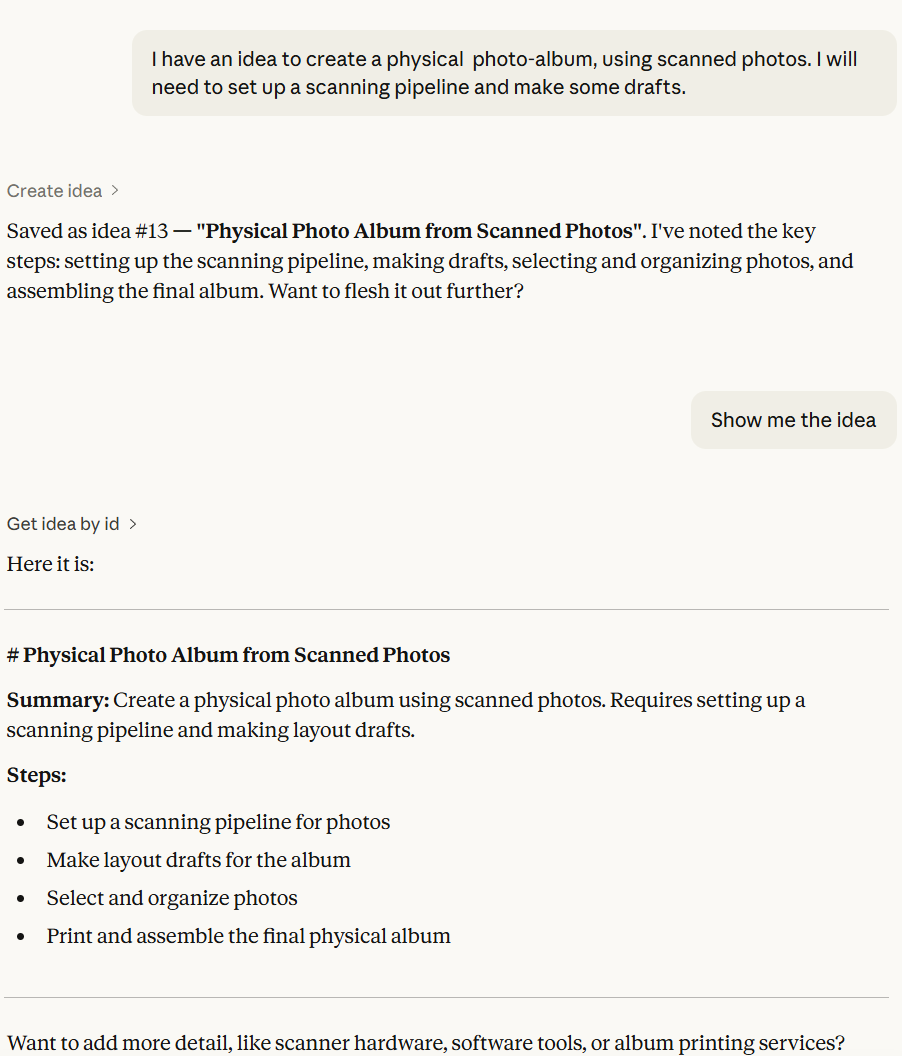
The agent did not just write the idea verbatim: it structured and enriched it. It even gave suggestions to expand on it.
The importer is not an integration
The note-mcp service includes a Logseq importer. A `logseq-import` command that bulk-imports markdown files from a Logseq graph directory. You can scope it to pages, journals, or both. It auto-tags imported notes with `logseq`, URL-decodes Logseq’s percent-encoded filenames, skips duplicates, and logs what it skipped.
It would be easy to describe this as “Logseq integration.” But it is not. It is a migration path.
Integration implies coexistence. Two systems connected, each maintaining its role, data flowing between them. You use Logseq for the UI experience; note-mcp provides the API. Changes in one reflect in the other.
The importer does none of that. It is a one-way transfer. It reads the Logseq files, writes them into note-mcp’s storage, and the job is done. After import, Logseq is not part of the system. The data has moved. The application has been left behind.
This distinction matters because it reflects a deeper architectural choice. Integration preserves the old tool’s role. Migration acknowledges that the role has ended. The importer says: your *data* matters. The years of notes, the accumulated knowledge, the links you built. The *application* that held the data does not. The content is durable. The container is disposable.
Every notes migration works this way. You don’t run Evernote alongside your new system. You export, import, and move on. The only thing unusual about this migration is what’s on the other end, which is not yet another notes app with a different UI, but a headless protocol server with no UI at all.
Tools are becoming protocols
This isn’t just about notes. There is a structural shift happening, and Logseq is one small example of a much larger pattern.
Consider LSP, the Language Server Protocol. Before LSP, every IDE implemented its own language intelligence: autocomplete, go-to-definition, error checking, refactoring. If you had M editors and N languages, you needed M × N implementations. Vim needed its own Python support. VS Code needed its own Python support. Each combination was a separate integration.
LSP collapsed this. It defined a protocol: a standard set of operations that any editor could speak and any language server could implement. Now you need M + N implementations instead of M × N. One Python language server works with every LSP-compatible editor. One editor supports every language that has an LSP server. The intelligence was decoupled from the interface.
MCP is doing the same thing for everything else.
Before MCP, connecting an AI agent to a notes system meant building a custom integration. Connecting it to a calendar meant building another. A task manager, another. M agents times N tools: M × N integrations, each bespoke. The MCP specification collapses this into M + N. Any MCP client can use any MCP server. The integration is the protocol.
Logseq freed the data from the vendor silo. Your notes were plain markdown in a folder. You could leave any time. That was genuinely progressive. But the operations (search, link, query) were still locked inside the application. You could take your data, but you couldn’t take the *capabilities*.
note-mcp frees the operations from the application. The data is still plain markdown. But now the operations are protocol endpoints, available to any MCP client, any HTTP client, any agent, any tool that speaks the protocol. The capabilities are not an application feature. They are a service that any consumer can invoke.
This is what it means for tools to become protocols. The application dissolves. What remains is the data layer and the protocol layer, with the intelligence (whether human or machine) connecting from the outside.
The headless future
note-mcp has no UI. No web dashboard, no Electron shell, no mobile app. It is a headless service.
This is not a temporary state while someone builds the frontend. It is the architecture. The vision statement says it plainly: “Full-featured note-taking UI” is listed as a non-goal. The server is a backend and an API. The clients are MCP tools and REST consumers.
Headless does not mean “no interface.” It means “any interface.” Claude Code is an interface. Claude Desktop is an interface. A curl command is an interface. A custom script that queries the API is an interface. A future notes app that speaks MCP is an interface. The headless server doesn’t choose its UI. It serves all of them equally, because the protocol doesn’t care who’s calling.
This is the constraint that creates freedom. By refusing to build a UI, note-mcp refuses to privilege one mode of interaction over another. A human reading notes and an agent searching for context are both first-class consumers. Neither needs the other’s interface. Neither is adapting to the other’s workflow.
The irony is worth noting. Logseq’s original selling point was data freedom: your notes are plain files, not locked in a database. You can take them anywhere. This was a meaningful step. But “you can take your data” is not the same as “your data is accessible.” Plain files in a folder are portable but inert. They don’t respond to queries. They don’t offer semantic search. They don’t announce their backlinks. Portability without protocol is an archive, not a service.
note-mcp goes further. The data is still in plain markdown. You can still read it with cat, edit it with Vim, version it with git. But the protocol layer makes the data active. It responds. It searches. It links. It serves any client that asks, in a format they already understand. Open data plus open protocol is more than the sum of its parts.
The question for every tool
Logseq solved a real problem. It gave people a way to build a personal knowledge base with bidirectional links, in plain text, with no vendor lock-in. It was better than Notion for people who cared about data ownership. It was better than Obsidian for people who thought in outlines. It earned its users.
But the problem is dissolving.
The problem Logseq solved was:
How does a human organize, navigate, and retrieve knowledge?
The outliner, the graph view, the queries, the sidebar. All of it was an answer to that question. A good answer. A thoughtful answer. An answer that assumed the human was the one doing the organizing, navigating, and retrieving.
When the agent handles those tasks, the answer changes. The agent doesn’t need cognitive aids. It needs data operations. It doesn’t need a graph view to understand structure; it needs a get_backlinks endpoint. It doesn’t need an outliner to think hierarchically; it needs notes with metadata and links. The capabilities that Logseq wrapped in a UI, note-mcp exposes as a protocol. The capabilities are the same. The packaging is different. And the packaging was the product.
This is not a criticism of Logseq. It is an observation about what happens when the primary user shifts from human to machine. Every tool faces this question eventually. Every application that was built to help a human perform a task will encounter the moment when an agent can perform the same task through an API, and will have to answer:
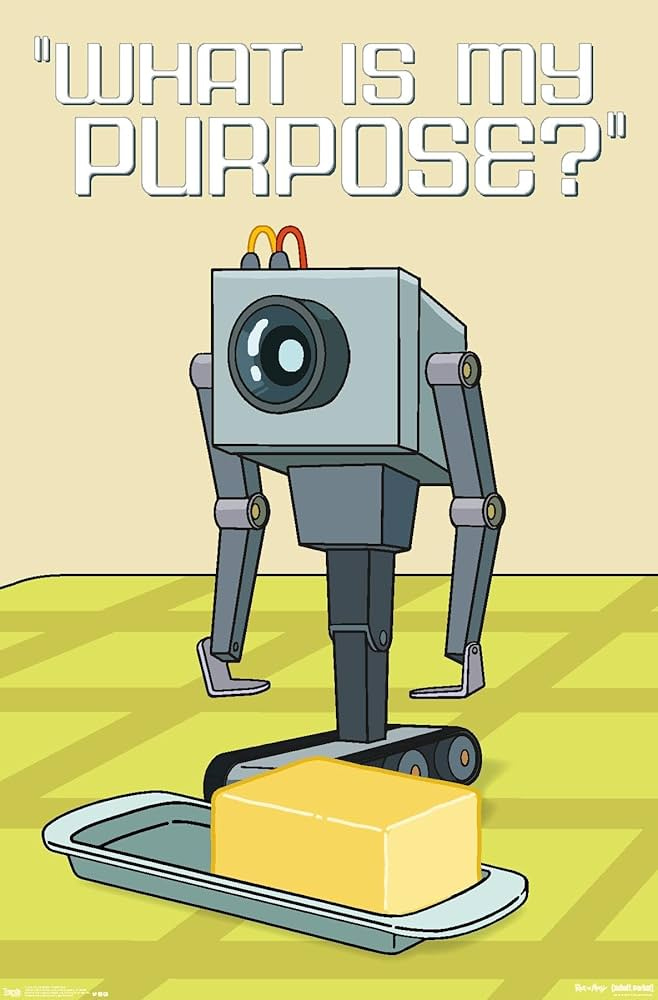
The answer for some tools will be: “I’m the interface the human prefers.” People will keep using Logseq, Obsidian, Notion, the same way people still use graphical git clients even though the CLI exists. Preference is valid. Familiarity has value.
But for the builder (the person designing systems, choosing architectures, deciding what to build next) the question is more pointed: If an agent were the primary user, would I build this the same way?
If the answer is yes, the tool has architectural integrity that transcends its interface. If the answer is no, you are looking at a skeuomorph. A beautiful, functional, well-designed skeuomorph, but a skeuomorph nonetheless. A tool shaped by a context that is passing.
That is why I didn’t integrate Logseq into my agent and instead migrated away from it. The data moved. The application stayed behind. The notes are still plain markdown.
They just answer to a different protocol now: one that doesn’t care whether the caller has eyes.
Sources
Model Context Protocol specification (MCP): the protocol standard for agent-tool communication; JSON-RPC 2.0, tool discovery, stdio and Streamable HTTP transports
Logseq : an open-source knowledge management system
Language Server Protocol (LSP): the protocol that decoupled language intelligence from editors, establishing the M + N pattern
note-mcp : my notes service which includes an MCP and HTTP REST server.
idea-mcp : my ideas service which includes an MCP server
Concepts
Skeuomorph: A design element that imitates the form of something that was once structurally necessary but no longer is. The leather texture on a digital calendar, the shutter sound on a phone camera, the save icon depicting a floppy disk. Applied to software: an application whose interface reproduces an interaction pattern designed for human cognition, persisting after the primary consumer has shifted to an agent that does not share those cognitive constraints.
Headless architecture: A system design where the backend exposes functionality through protocols and APIs without providing its own user interface. “No UI” means “any UI”; any client that speaks the protocol is a valid interface. In the context of AI agents, headless architecture treats human and machine consumers as equally first-class, refusing to privilege one interaction mode over another.
Protocol-first design: An architectural approach that prioritizes the protocol layer (the set of operations and their contracts) over the application layer (the UI and its workflows). The protocol is the product; applications are optional clients. LSP is protocol-first for language intelligence. MCP is protocol-first for agent-tool communication. note-mcp is protocol-first for knowledge management.
Model Context Protocol (MCP): An open protocol introduced by Anthropic that standardizes how AI applications connect to external tools, data sources, and services.
Exosomatic memory: Memory stored outside the body. Stories, writing, books, databases, notes apps: all ways of offloading what the brain cannot hold.
Data portability vs. data accessibility: Data portability means you can export your data and take it elsewhere (e.g., Logseq’s plain markdown files). Data accessibility means your data responds to queries, serves search results, and announces its structure through a protocol. Portability without protocol is an archive. Accessibility through protocol is a service. Open data plus open protocol is more than the sum of its parts.